DeLog:Week 10 Interfaces and Instances
User Interface (UI) is often the primary bridge between the player and the game’s underlying systems. This week, the focus was on moving beyond basic visual placement to engineer functional, responsive menus and in-level displays that provide clear, real-time feedback.
Technical Implementation:
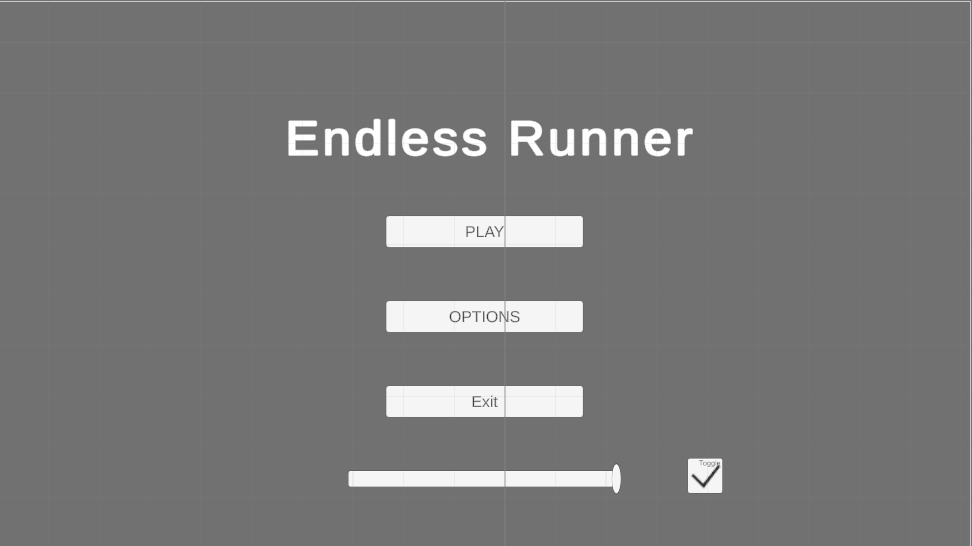
UI Framework & Navigation: I focused on the Unity UI (UGUI) system, building a scalable menu architecture. This included interactive Buttons for navigation and Sliders for player-facing settings like volume and sensitivity, ensuring all inputs are correctly mapped to their respective managers.
Dynamic Feedback Loops: Utilizing the event-driven logic from previous weeks, I linked my Health and Inventory systems to the UI. I used Sliders for health bars and Text elements for coin counts, ensuring they update instantly via UnityEvents rather than expensive Update() checks.
DOTween for UX: To improve "Game Feel," I implemented DOTween animations for UI transitions. Buttons now respond with subtle scale shifts on hover, and menus "fade and slide" into view, providing the professional polish expected in modern applications.
Layout and Responsiveness: I utilized Anchors and Layout Groups to ensure the UI is responsive across different screen aspect ratios, a critical requirement for cross-platform professional development.
Reflection: Bridging Logic and Player Experience
This week reinforced that UI is more than just graphics; it is a communication tool. By engineering my menus to be modular and responsive, I’ve ensured that the player always understands the game state. For a developer, the challenge is making these systems "transparent" so intuitive that the player never has to struggle to find the information they need.