DevLog: Week 3 Intro to Code
Week three of the Skills Bootcamp in Game Development has been a pivotal period of transition. While my university degree provided a strong theoretical background, this week was about elevating those concepts to meet the high-standard technical requirements of professional production.
The primary objective was clear: to understand and experiment with the core features of a modern game engine while establishing a robust, scalable technical base to build upon in the months to come.
Mastering the Modern Game Engine Ecosystem
Unity is far more than a rendering tool; it is a complex ecosystem of physics, scripting, and event-driven logic. This week allowed me to dive "under the hood" to explore the mechanics that differentiate a quick prototype from a polished, shippable product.
Component-Based Architecture: I focused on re-evaluating how data and logic are separated within the Unity Inspector. By creating more modular GameObjects, I am ensuring that my systems are easier to debug and more flexible for future iterations.
The Execution Order & Life Cycle: Deepening my understanding of the Unity Life Cycle, specifically the nuances between
Awake,Start,Update, andFixedUpdatewas essential. Mastering this ensures that physics calculations and logic updates are synchronized perfectly, preventing "jitter" or race conditions that often plague complex builds.
Spatial Logic: Experimenting with Trigger Areas
A core feature of any interactive engine is its ability to process spatial data. I spent significant time experimenting with Trigger Areas to create "smart environments."
Instead of relying on simple physical collisions, I utilized triggers as invisible sensors to detect player presence. This isn't just about functional basics like opening doors; it is about building a foundational system where the environment "knows" where the player is. This allows for:
Optimized lighting changes
Dynamic narrative triggers
Efficient enemy spawning logic
Event-Driven Design: Custom Unity Events
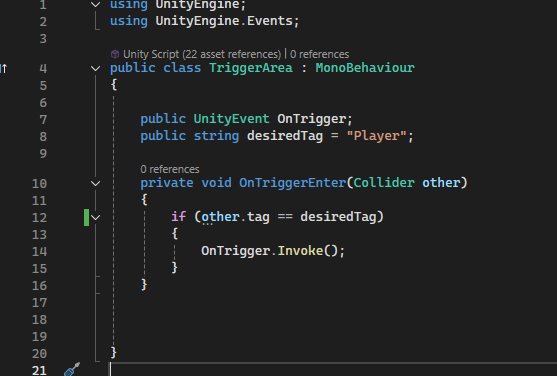
Perhaps the most significant technical leap this week was the implementation of Custom Unity Events (UnityEngine.Events). In professional development, "hard-coding" references between scripts is a major pitfall that leads to fragile code.
By adopting an Event-Driven Architecture, I established a decoupled system:
The Trigger Script: Only knows that an "Event" has occurred (e.g., a player entered a specific zone).
The Listener Scripts: Independent systems (UI, Audio, Animation) "listen" for that event and react on their own.
Professional Value: This approach is highly sought after by studios because it facilitates modular development. It allows a sound designer or animator to link effects to a trigger directly in the Unity Inspector without a programmer ever needing to modify the core C# script.
Establishing the Base for Growth
I didn't just write scripts this week; I developed a library of "Utilities"—reusable C# classes for common tasks—that will serve as the backbone for my future projects.
By prioritizing Clean Code and SOLID principles now, I am ensuring that as my projects grow in complexity, the technical debt remains low. I am focused on building a framework, not just a standalone game.
Reflection: The Shift in Perspective
Coming from a university background, it is easy to focus purely on the "what" (the end result). This week, I shifted my focus entirely to the "how" (the architecture). Understanding the deep integration between the C# API and the Unity Engine’s core features has given me the confidence to build systems that are not only functional but professional and production-ready.
Technical Milestone: Developed a generic "Event Trigger" system that can be repurposed for any environmental interaction throughout the remainder of the bootcamp.